

Enable Google reCAPTCHA on hosted authentication
Turn on reCAPTCHA from Authentication > Add-ons. Pick the flows. Hosted pages verify the token.
From the changelog: Enable Google reCAPTCHA from Add-ons

Authdog Team
Hosted sign-in is a public form. Bots treat it like any other login page: credential stuffing, waitlist spam, password-reset floods, one-time-code grinding. Authdog can require Google reCAPTCHA on those hosted pages, configured per environment from Authentication > Add-ons.
This walkthrough is the longer note behind the September 8 changelog entry. The add-on itself shipped earlier; this is how you turn it on and what the hosted page looks like after.
What the hosted page looks like
With v3 enabled, the Account Portal does not show a checkbox. Google's badge sits in the corner. Submit still posts a token; Authdog verifies it before the flow continues.
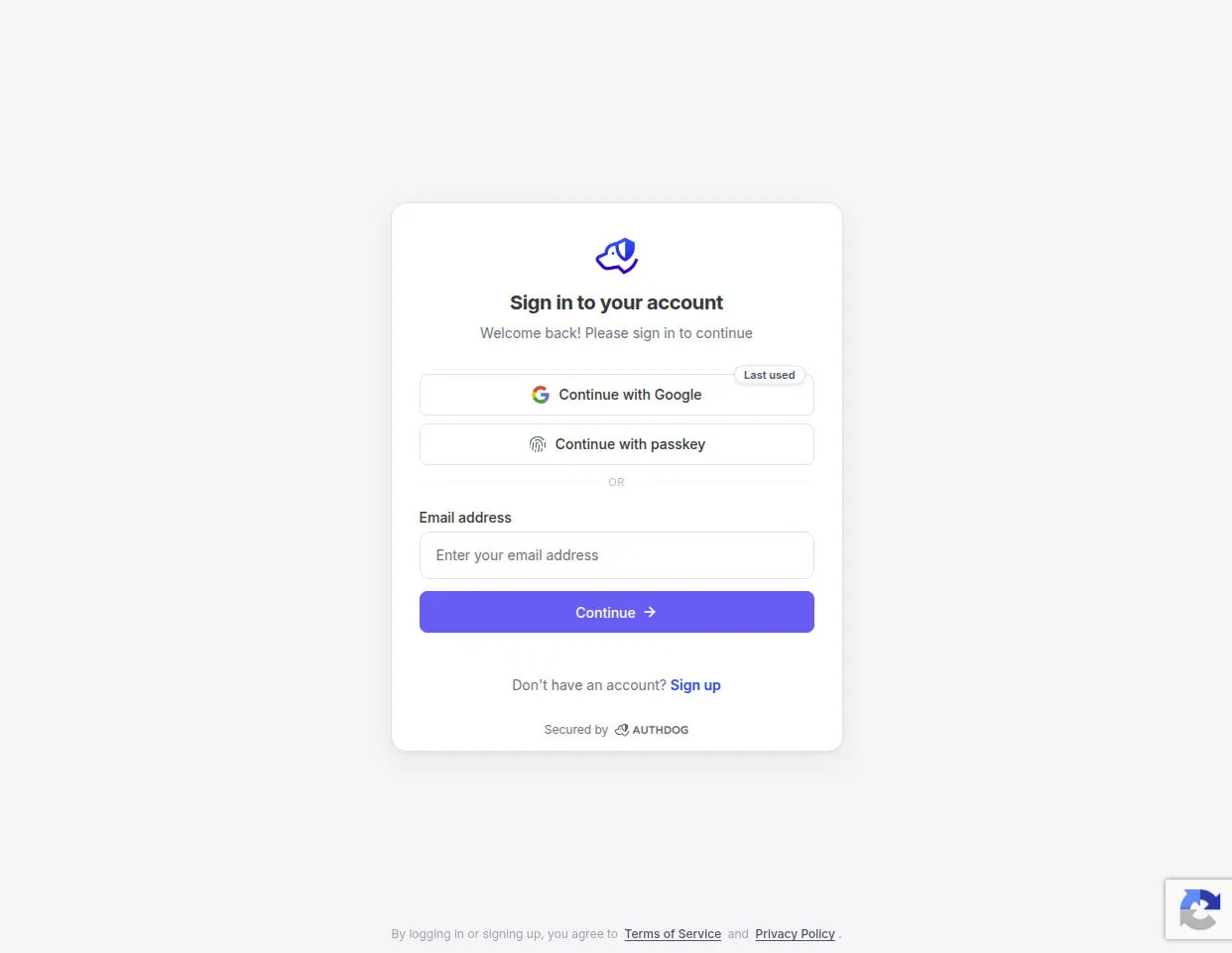
Hosted sign-in after v3 is enabled. The badge is Google's. The form is Authdog.
v2 is the visible "I'm not a robot" checkbox. It only applies to sign-in, sign-up, waitlist, and password reset. Magic link, one-time codes, and MFA have no room for a checkbox — those flows need v3 (or Turnstile in invisible mode).
Open the add-on
In the console, select the project and environment, then Authentication > Add-ons. Find Google reCAPTCHA and choose Enable.
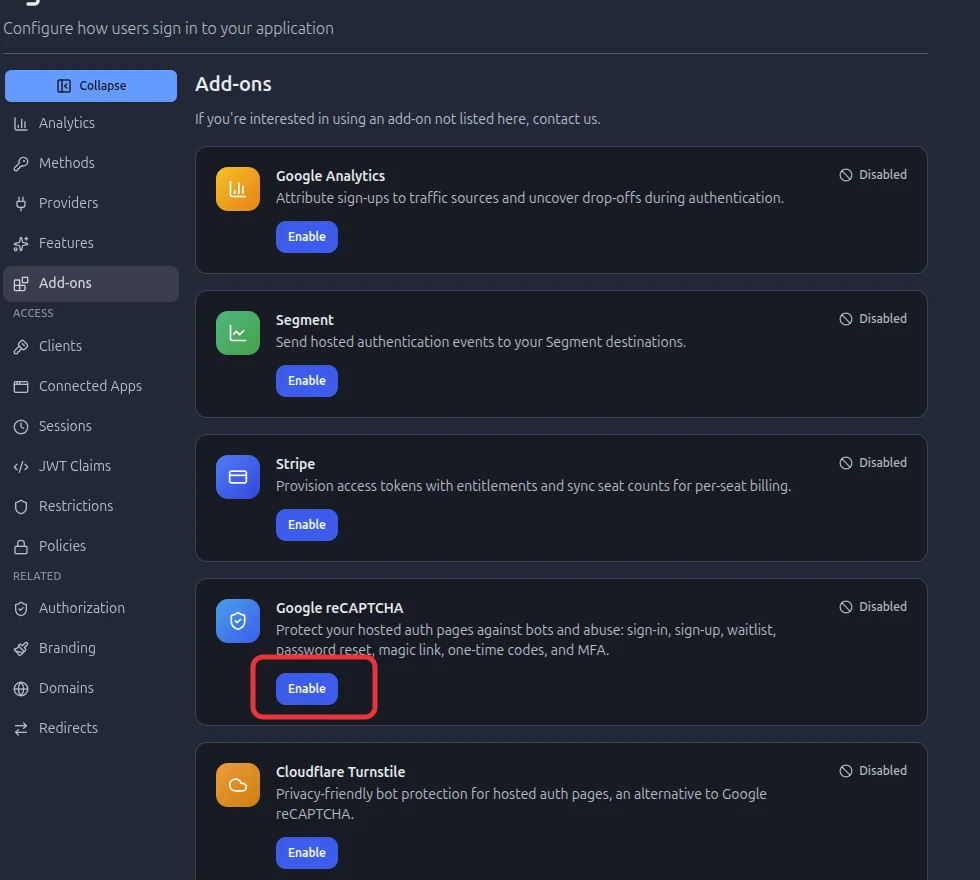
Add-ons is environment-scoped. Development and production use different keys.
Cloudflare Turnstile is listed next to it. Pick one. If both add-ons cover the same flow, reCAPTCHA is used.
Create the site in the Google reCAPTCHA admin first. Add every hostname that serves your Authdog auth pages, including any custom domain. A domain mismatch makes Google reject every token, and every protected attempt then fails closed.
Configure the dialog
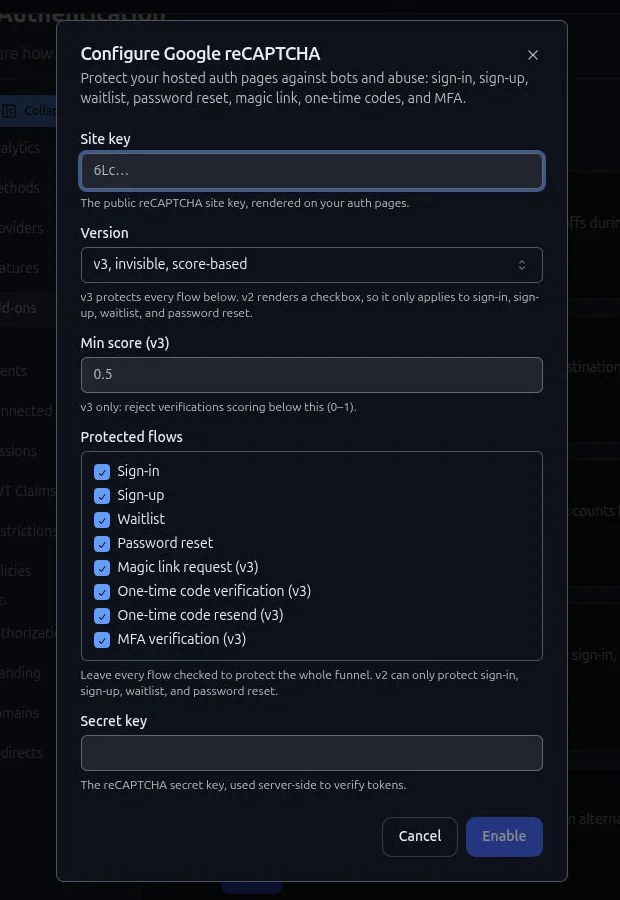
The dialog maps 1:1 to the add-on config: public site key, version, optional v3 floor, protected flows, secret.
Fill it in this order:
- Site key — public. Rendered on the hosted pages.
- Version —
v3, invisible, score-basedorv2, checkbox challenge. - Min score (v3) — reject scores below this. Default
0.5, range0–1. Start permissive, watch traffic, then tighten. Too high and you block people on shared networks and privacy-hardened browsers. - Protected flows — leave every box checked to cover the whole funnel. Uncheck a flow to skip the challenge there.
- Secret key — server-side only. Encrypted at rest, never returned to the browser, used only to call Google
siteverify.
Then Enable. The add-on cannot turn on without a site key. On a later edit you can leave the secret blank to keep the stored one.
Protected flow names match the bot protection table:
| Console label | Action | v2 checkbox | v3 invisible |
|---|---|---|---|
| Sign-in | signin |
Yes | Yes |
| Sign-up | signup |
Yes | Yes |
| Waitlist | waitlist |
Yes | Yes |
| Password reset | password_reset |
Yes | Yes |
| Magic link request | magic_link |
— | Yes |
| One-time code verification | otp_verify |
— | Yes |
| One-time code resend | otp_resend |
— | Yes |
| MFA verification | mfa_verify |
— | Yes |
v3 can score every row. v2 on an invisible-only row does nothing useful — those pages never render a checkbox, so no token is minted.
How verification works
Hosted pages resolve one captcha provider, inject the site key, and send the token with the form. Identity verifies it against google.com/recaptcha/api/siteverify and forwards the client IP when it is known.
For v3, Authdog also checks the score against your minimum. When Google echoes an action name, it must match the flow being attempted, so a token from sign-in cannot satisfy sign-up.
A missing or invalid token fails closed. So does an enabled add-on whose secret cannot be decrypted. The user sees a verification error and the attempt does not proceed.
A Google siteverify outage fails open so a Google incident cannot take down auth. Confirm a new setup with a real hosted sign-in in development: if the wrapping key and secret do not match, identity blocks until they do.
Bot protection filters traffic before authentication. It complements Lidar and rate limiting; it does not replace them.
Trust boundaries
Authdog trusts Google's siteverify response for the configured secret. Store the secret only in Authdog. Keys are per environment and are not copied between them.
Self-hosted deployments that cannot reach Google cannot use this add-on.
Try it
Enable v3 on a non-production environment, leave the flows checked, and complete hosted sign-in. You should see the badge and a successful continue. Then try production keys on the production environment.
Full reference: Bot protection. The original ship note is Google reCAPTCHA on hosted authentication.